


Inter Banking & Money Transfer
Banco Inter SA
Managing money from a phone is only useful when the app remains understandable under pressure. I tested Inter Banking & Money Transfer with that in mind, looking beyond its broad promise of digital banking, investing, and international transfers. My main question was simple: can someone with different visual, motor, sensory, or situational needs move through financial tasks without unnecessary confusion?
Banco Inter SA’s finance app is free, rated for Everyone, and has become a very familiar option in Brazil’s digital banking space. Its average rating is 4.4 from around 4.7 million ratings, while its reach has passed 50 million installs. Those figures suggest strong everyday adoption, but they do not automatically mean that every screen works equally well for every person. In my experience, the real value depends on what you need to do, how often you do it, and whether you are comfortable checking important details on a compact screen.
How clearly the app presents everyday banking
Readability and navigation in practical tasks
Inter Banking & Money Transfer brings several financial jobs into one place rather than separating them between a traditional bank app, an investment platform, and a remittance service. That can be convenient when I want to check my balance, move money, review an investment-related area, or begin an international transfer without changing services. The trade-off is that an all-in-one design can feel busier than an app built around one narrow task.
The first thing I notice in a financial app is not how attractive the home screen looks, but whether I can quickly identify the action I need. Inter’s broad scope means the navigation has to serve people who only want a basic account view as well as people exploring investments or international money movement. For a confident smartphone user, that concentration is efficient. For someone who prefers a short, predictable path, the number of available areas may require more attention before the correct option becomes obvious.
I find it helpful to approach the app with a specific task rather than browse casually. If I need to transfer money, I look for the transfer route and pause before confirming the recipient and amount. If I am checking an investment area, I treat it as a separate visit instead of mixing it with routine banking. This sounds minor, but separating tasks reduces the chance of tapping through a financial screen while distracted.
Latest News

Uber Eats Under Pressure: What Happens When Delivery Goes Wrong

How QR & Barcode Scanner Adapts to Android and iOS Innovations

Why Waze Navigation & Live Traffic Is Your Essential Travel Companion

CapCut Mastery: Unleash Hidden Features for Pro-Level Editing

How OS Updates Enhance Roblox Adventures

Teacher Simulator: Exam Time Turns Quick Classroom Judgments into a Repetitive Loop
The interface is most readable when I give it time. Banking apps often place balances, buttons, notices, and promotional content close together, and an app with several financial services has more competing information than a simple account viewer. I would not recommend rushing through a payment while walking, commuting, or dealing with a noisy conversation. A calm setting makes the labels easier to interpret and gives me a better chance to catch an incorrect amount.
For users who rely on enlarged text, the important question is whether the layout remains comfortable after the phone’s text size is increased. I would test that personally before making Inter the only way to access an account. Larger text can improve reading, but it can also make dense screens require more scrolling or cause some controls to sit farther apart. That is not unique to this app, yet it matters more when a single screen combines banking, investing, and transfer functions.
Useful habits for people who need a slower, clearer workflow
One practical habit is to prepare the information before opening the transfer flow. I keep the recipient details, currency, and intended amount available so I am not switching between apps or notes halfway through the process. This is especially useful for anyone who finds rapid visual changes tiring or who has difficulty remembering information while navigating several screens.
Gallery
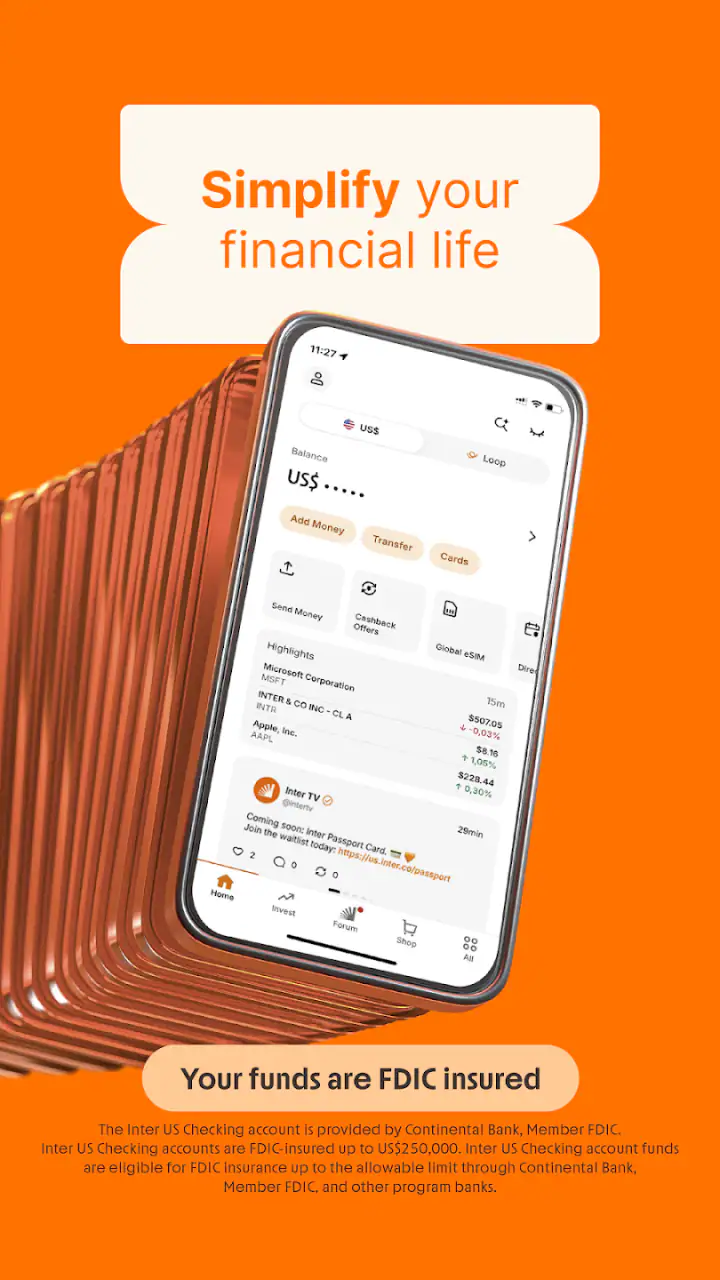
I also recommend reading confirmation screens aloud or using the phone’s built-in reading support when that is comfortable. Financial actions deserve a deliberate final check, and hearing the amount and recipient can provide a second way to catch a mistake. I would not treat any accessibility aid as a substitute for reviewing the transaction, but it can make the review less dependent on small text alone.
Another non-obvious advantage of a combined banking app is that it can reduce context switching. Someone who has difficulty moving between multiple applications may prefer keeping ordinary banking and international money tasks in one familiar environment. The downside is that a problem in one crowded navigation system can affect several kinds of financial activity at once. A focused alternative may be easier for a user who wants only transfers and nothing else.
Motor and sensory considerations
Touchscreen banking creates a particular challenge for people with tremors, limited dexterity, or fatigue. A transfer is not a task where accidental taps are harmless. I prefer to use the app while the phone is supported on a table, with one hand steadying the device and the other selecting controls. That setup is more reliable than trying to complete a sensitive action one-handed while standing.
People with tremors may benefit from slowing down between screens rather than tapping repeatedly when a response is not immediate. Repeated taps can create uncertainty about whether a command was accepted. I would wait for the screen to change, then verify the result, especially around money movement. If a user needs large physical controls or has difficulty making precise selections, a bank with a simpler interface or an assisted channel may be a better fit for high-value transactions.
For users with low vision, the phone’s system-level contrast, magnification, and screen-reading tools are worth testing with the actual app. I would check the balance view, transfer fields, confirmation page, and investment screens separately because a layout that feels comfortable in one area may be more demanding in another. I cannot assume that every visual element will be equally clear simply because the app is popular.
Users with hearing loss may find a visual banking workflow preferable to one that depends on spoken communication, but important alerts still need careful attention. I would keep visual notifications available and review transaction history rather than relying on an audible signal or a vibration alone. People with sensory sensitivity may also prefer disabling nonessential phone notifications and opening the app only when ready to focus.
Those with cognitive disabilities or memory difficulties may appreciate a repeated routine: open the app, identify the account area, complete one task, review the final details, and close the session. I would avoid starting several actions at the same time. The combined service model is powerful, but it rewards users who create their own structure instead of following every visible option.
Using the app when circumstances are less than ideal
Situational access during real-life banking
A realistic example is receiving money from someone abroad while caring for a child, working from a shared space, or dealing with a poor connection. In that situation, having banking and international money movement together can save time and reduce the need to remember several logins. I would still wait until I had privacy and enough concentration to verify the currency, recipient, and final amount. Convenience matters, but financial mistakes made in a hurry are harder to undo than an extra minute spent checking.
The app can also suit a person who travels and wants one familiar place for ordinary account activity and international transfers. That is where its all-in-one approach feels more useful than maintaining separate specialist services. However, travel often brings low battery, glare, unstable connectivity, and unfamiliar surroundings. I would not begin a complicated transfer at an airport gate or in a crowded queue. A larger screen, stable connection, and quiet environment are safer when the transaction has several details.
For older adults moving from branch banking to mobile banking, the appeal is understandable: routine financial tools are available without a trip to a branch. Yet the app may still feel like a lot to learn because its scope extends beyond basic account management. I would introduce it one task at a time, beginning with viewing the account and then practicing a low-risk transfer workflow. A trusted person can help with orientation, but the account holder should keep control of passwords and confirmation steps.
People sharing a household device should think about privacy as well as accessibility. A large display can make reading easier, but it may expose balances or transaction details to anyone nearby. I would use the app in a private setting and avoid asking another person to handle sensitive steps merely because the interface is difficult to read. If assistance is necessary, the safest arrangement is to keep credentials private and have the helper explain the screen rather than take over the account.
For users with limited data plans or older phones, the practical experience may depend on how comfortably the device handles a modern financial app. The current version is 26.7.2 and requires Android 7.0 or later. That makes the compatibility requirement clear for Android users, but compatibility alone does not guarantee that an older handset will feel responsive or easy to read. I would update the operating system where possible and test routine access before relying on it for urgent payments.
Where it compares well with simpler alternatives
Compared with a traditional bank’s branch-first model, Inter is more convenient for people who want to handle routine banking independently from a phone. Compared with a narrowly focused transfer service, it offers a wider financial home: banking, investing, and international money movement sit within the same product. That breadth is the strongest reason to choose it.
A specialist remittance app may be easier for someone who only sends money internationally and wants fewer unrelated menus. A dedicated investment platform may offer a more focused experience for a person whose main priority is researching and managing investments. A conventional bank may still be preferable for someone who values face-to-face help, uses cash frequently, or does not want a digital-only routine. Inter is not automatically better; it is better when consolidation matters more than narrow simplicity.
The app’s free price removes one obvious barrier to trying it, but cost is not the only consideration in finance. I would compare the actual terms shown during the specific transfer or service I plan to use, particularly when currency conversion or international movement is involved. A free app can still involve transaction conditions, exchange-rate differences, or service-specific costs, so I would never judge the whole experience from the download price alone.
Remaining barriers that deserve attention
The biggest barrier is concentration. A person with limited attention, visual fatigue, or anxiety around financial decisions may find an all-in-one dashboard more demanding than a single-purpose tool. The same breadth that saves me from switching apps can create more choices at the moment when I want one clear answer. I would skip Inter as my primary option if even routine tasks consistently leave me unsure which area I entered or what I am confirming.
Another barrier is the sensitivity of the information involved. Accessibility is not only about reaching a button; it is also about understanding a financial consequence before submitting it. If a user cannot comfortably review amounts, recipient information, or transfer details on a phone, the app should not be the only access route. A larger screen, an official support channel, or a different banking method may be more appropriate for important transactions.
International transfers also add cognitive load because the user may need to think about currencies, recipients, timing, and the final amount. I would not recommend starting with a complex transfer as a first test of the app. Begin with navigation and account viewing, learn where confirmations appear, and only then consider a transfer when the process feels familiar. This staged approach is particularly valuable for users with memory, attention, or motor challenges.
There is also a human support question. Some people want a bank that can explain an issue patiently in person, especially after an error or an unfamiliar notification. A mobile-first experience cannot replace that preference for everyone. If personal assistance is central to your financial confidence, choose a service whose support model matches that need rather than selecting Inter only because it combines many features.
Who I would recommend it to
I would recommend Inter to a phone-comfortable user who wants banking, investing, and international money transfers gathered in one finance app. It is especially appealing when reducing app switching is important, when routine access from different locations matters, and when the user is willing to slow down for confirmation screens. The broad service range makes it more useful than a basic account app for people whose financial life crosses several categories.
I would be more cautious for someone who needs very large controls, has difficulty with precise touch input, or becomes overwhelmed by multi-purpose menus. That person should test the app with the phone’s accessibility settings and a low-risk task before moving important financial activity into it. If reading or confirming details remains difficult, a simpler alternative or non-phone support route is the responsible choice.
My inclusive verdict
Inter Banking & Money Transfer is a capable choice for people who want a broad digital banking experience without maintaining separate apps for every financial need. Banco Inter SA has built a product with substantial reach, and its free availability makes experimentation easier. Its rating of 4.4 and large user base are reassuring signs of familiarity, but I still judge it by the individual workflow rather than popularity.
My honest view is that its accessibility depends heavily on the user’s device settings, dexterity, vision, concentration, and comfort with mobile finance. I value the reduced context switching and the ability to keep ordinary banking, investing, and international transfers close together. I am less enthusiastic about asking a user with accessibility needs to navigate a busy financial environment without first testing the text size, screen-reading support, touch accuracy, and confirmation flow.
The best reason to choose this app is consolidation; the best reason to pause is the responsibility of checking complex financial actions on a small screen. Try it in a quiet setting, create a repeatable routine, and verify every important detail before confirming. For the right user, that balance makes Inter a practical everyday banking companion. For someone who needs maximum simplicity or regular human guidance, a more focused or assisted alternative may provide a safer and more comfortable experience.
FAQs for Inter Banking & Money Transfer
What features does the Inter Banking & Money Transfer app offer?
The Inter Banking & Money Transfer app provides a comprehensive suite of features including balance checking, transaction history, fund transfers, bill payments, and currency exchange. Additionally, it offers seamless integration with digital wallets and supports both local and international transfers, making it an all-in-one solution for managing your finances.
Is the Inter Banking & Money Transfer app secure to use?
Yes, the app prioritizes user security by employing advanced encryption protocols and two-factor authentication. Regular updates ensure the latest security measures are in place, protecting your personal and financial information from unauthorized access. Users can also set up biometric login for added security and peace of mind.
Are there any fees associated with using the Inter Banking & Money Transfer app?
The app offers free basic services such as balance inquiries and domestic transfers. However, some services, like international money transfers or currency exchange, may incur fees. These charges vary depending on the service and destination. Users are advised to review the fee structure in the app before proceeding with transactions.
Can I use the Inter Banking & Money Transfer app internationally?
Yes, the app supports international use, allowing users to transfer money across borders with ease. It offers competitive exchange rates and supports multiple currencies. However, availability of certain features may vary by region, so it's recommended to check regional restrictions and service availability within the app.
How user-friendly is the Inter Banking & Money Transfer app?
The app is designed with user-friendliness in mind, featuring an intuitive interface that makes navigation simple even for first-time users. It provides clear instructions and helpful tutorials for performing various banking tasks. Customer support is also available to assist with any issues or questions that may arise.
Pros
- User-friendly interface simplifies transactions.
- Supports multiple currencies for global use.
- Real-time notifications enhance security.
- Offers competitive exchange rates.
- 24/7 customer support is readily available.
Cons
- Limited offline functionality may hinder access.
- High fees for international transfers.
- Requires stable internet for optimal performance.
- Limited customization of transaction alerts.
- Some features locked behind premium plans.


